WordPress Amazon S3 plugin is a simple plugin which will helps you to transfer your media files used in a post to Amazon S3 cloud. It uses wordpress post filters to scan the post content for images and media files and schedule them for upload queue. If the media file is already scheduled and uploaded to s3 then it will change the urls on the fly for the content. There is no update done to the content or anything in the database. This make this plugin to be really safe.
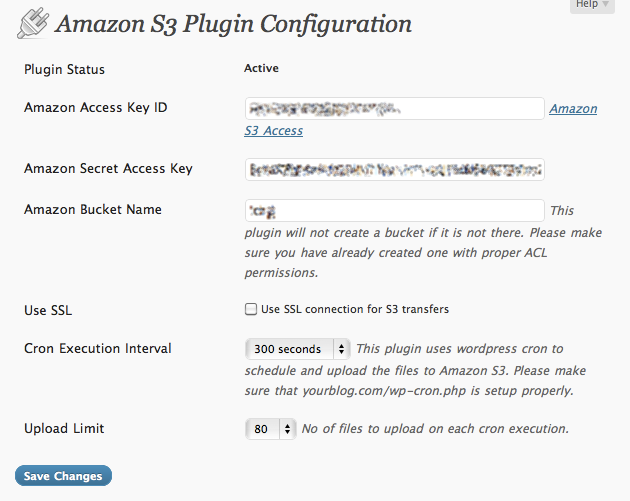
There are few things you have to note using this plugin
- It will not create any Amazon S3 buckets
- It will not work if you have not configured your wordpress corn file [wp-cron.php]
- You have to have a make sure s3temp folder is writable on the media upload folder. This help the plugin to avoid database hit for checking the availability of the files in S3 cloud.
- This plugin will not manage the files in Amazon S3 cloud. You can use S3fm or S3Fox
- If you want to reset the files and upload everything again, please delete all files in s3 folder, delete the files in S3 bucket or use a new bucket.
If you have any queries please post on a comment or ask in wordpress support forum for wp-s3.
Download WordPress Amazon S3 Plugin
More information on WordPress Amazon S3 Plugin
If you find this plugin useful please donate few dollars 😉
Thanks for this plugin it’s an excellent idea for amazon.
It works like a charm !
[…] WordPress Amazon S3 Plugin […]
[…] WordPress Amazon S3 Plugin […]
[…] Author’s website – Imthi […]
[…] Author’s website – Imthi […]
[…] Amazon S3 plugin […]
Thanks for the plugin, works great!
Hi, I keep getting “directory not writable” error.
Can you tell me the exact permission that I have to use to solve this issue?
I guess using 777 is hazardous.
Dear Vikas
You can edit this line and change to a folder which is outside public_html and give full 777 access to the folder
$this->s3CacheFolder = ABSPATH . ‘wp-content’ . DIRECTORY_SEPARATOR . ‘s3temp’ . DIRECTORY_SEPARATOR;
To (It can be anything as per your file structure)
$this->s3CacheFolder = ‘/home/temp/s3temp’ . DIRECTORY_SEPARATOR;
What really should I do to have my web page for the top of google do I require to hire an seo firm or can I do it myself thanks for the help
Is this plugin supposed to automatically upload all your previously uploaded media to S3? Cause if, it doesn’t seem to work for me. And i also had to change the $this->s3CacheFolder location since i kept getting the “folder not writable”-error, even though it was placed in wp-content/uploads/s3temp with the permission 0777.
I think that problem is when you have your uploads automatically structured by date (eg. uploads/2010/07/) from wordpress’ media settings.
[…] Amazon S3 plugin […]
nice plugin:) Thanks.
This is a very good basic module for media integration with Amazon S3 functionality.
I have just installed it on a site with around 15k visits per day and we are just in the process of monitoring site performance and traffic distribution.
I have also extended the functionality to include support for a Amazon CloudFront URL that allows the module to be used in conjunction with CloudFront for distribution.
A PayPal contribution is on the way!
It will not work if you have not configured your wordpress corn file [wp-cron.php]?
How do I confige this? What do I have to do?
Also, I installed the plugin but on the plugin page it shows as Disabled. How do I enable it?
s3temp folder? Where can this be found?
WordPress is definitely the best blogging platform, no one can beat wordpress~-~
While I like the concept of this plugin, it presents a risk, in that the s3 credentials (including a visible secret key) are available for anyone with a blog login. This is a security risk, in that it would provide access to ALL the account holder buckets.
Secondly, with Amazon’s new Cloudfront CDN “Origin Pull”, it’s much easier to let the CDN do all work of getting the images to the site. Then with a simple URL rewrite plugin like CDN linker (http://wordpress.org/extend/plugins/ossdl-cdn-off-linker/) prompts Amazon to do all the work.
CDN Origin Refs:
http://macintoshhowto.com/other/how-to-use-amazon-cloudfront-to-serve-your-wordpress-site.html
http://aws.typepad.com/aws/2010/11/amazon-cloudfront-support-for-custom-origins.html
http://aws.amazon.com/cloudfront/faqs/#How_do_I_use_Amazon_CloudFront
I keep getting directory not writable even tho I have set permissions to 777 & I have tried moving to /home/tmp/s3temp
Still get the error any help?
I absolutely love this plug-in! It saves me so much time at work! Thank you for all your efforts with this.
Hi guys,
I’m not able to enable the plugin… it says Connections failed, plugin not active. I have my access details correct, because it is working on my S3 organized. Any ideas what could happen?
Hello,
Is the plugin still works with WordPress 3.5? I find no functional plugin: (
thank you very much
@simon I am not sure whether it works, will soon check and release an update 🙂
1.1/1.2 update caused my installation to stop working. No more rewrites to existing bucket files, and uploads to bucket stopped as well. Using v3.6.1, reverting back to plugin v1.0 puts everything back in order.
Please advise.